
When an issue in your GoDaddy Airo AI Builder site or app won't budge, Diagnostics in Airo AI Builder takes a deeper look, applies a fix in chat and hands off to support if you still need help. You don't have to start over, switch tools or explain the problem from scratch.
No AI credits, ever. Diagnostics doesn't use your AI credits, for the investigation or the fix it applies. GoDaddy covers the cost, so a stubborn issue never eats into your credit balance.
Building should feel like momentum. Most of the time, Airo AI Builder spots problems and fixes them as you go. But sometimes an issue is stubborn. You describe it, Airo AI Builder tries to fix it, and the same thing keeps happening. That's exactly when Diagnostics steps in.
Try GoDaddy Airo AI Builder. Describe your idea in your own words and keep building while stubborn issues get a deeper look. Building is free with 50 free AI credits per month, no credit card required. Publishing on your own domain requires a paid plan. Try GoDaddy Airo AI Builder
What is Diagnostics in Airo AI Builder?
Diagnostics is extra help built into GoDaddy Airo AI Builder for technical issues that won't go away. When the usual fixes haven't worked, Airo AI Builder calls in a context-aware investigation agent. It picks up where you left off, finds the real cause, applies a fix in the same chat and checks with you that it worked. Neither the investigation nor the fix uses your AI credits, and it's available to all Airo AI Builder customers in every market.
Who is Diagnostics for?
- Small business owners building a site or app who want problems solved, not a troubleshooting job
- Creators and side hustlers who would rather keep building than debug
- Agencies and freelancers who need client builds to keep moving
- Anyone who has typed "it's still not working" into a chat and wished someone would just take a closer look
Airo AI Builder fixes most issues first
As you build, Airo AI Builder spots when something goes wrong in your app and fixes it for you, often before you notice. Airo AI Builder catches certain technical errors during the build, so you don't pay for them.
That handles most everyday hiccups: a layout that breaks, a page that doesn't load the way it should, a button that isn't wired up. You describe it, Airo AI Builder fixes it, and you keep building. For quick text and image changes, you can also edit your site directly in Edit mode.
When does Diagnostics step in?
Diagnostics steps in when Airo AI Builder has already tried to help and you're still blocked. For example:
- Airo AI Builder has already tried to fix it, and the problem is still there
- You report the same issue again
- You say you've already retried
- You've narrowed it down yourself, such as noticing that something works in one place but not another
You don't need to ask for Diagnostics or switch anything on. Airo AI Builder recognizes that you're stuck and calls it in for you.
What Diagnostics is not for
Diagnostics is built for technical issues and failures in your app, like something that breaks, shows an error or stops working as expected. It doesn't handle:
- Billing or account access
- A new domain that is still connecting (see how to connect a custom domain)
- How-to questions
- Feature requests
And when you first report a problem, Airo AI Builder tries its usual fixes before calling in Diagnostics.
How does Diagnostics work?
Diagnostics runs right inside your chat, in four steps.
- Airo AI Builder calls in backup. When the usual fixes aren't enough, Airo AI Builder brings in a context-aware investigation agent. It already knows your app and what you've tried, so you don't repeat yourself.
- It digs deeper. The investigation agent looks into your app and how it's running to find the real cause, not just the symptom.
- The fix is applied. When the fix belongs in your app, Airo AI Builder applies it in the same chat.
- You confirm. Airo AI Builder asks you to check, with two quick options: Yes, it's fixed or Still not working.
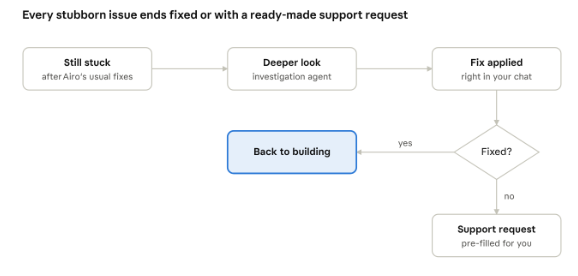
If the fix works, you're back to building. If not, Airo AI Builder gets a support request ready for you.
What happens if it's still not fixed?
Sometimes the fix needs to happen on our side, not in your app. When that's the case, Airo AI Builder doesn't guess or change things it shouldn't. Anything that needs a fix on our side goes to our team. And on paid plans, Airo AI Builder can offer to hand you over to our support team directly.
That handoff is built to save you time:
- The form is already filled in. Airo AI Builder drafts your support request with a summary of the issue and what has already been tried.
- You stay in control. Review it, edit anything you like and add details only you know.
- Submit in one click. Your request goes to our support team with the full story, so nobody asks you to explain it all again.
On the free plan, Airo AI Builder guides you to contact GoDaddy support.
Usual fixes, Diagnostics and support at a glance
| Usual fixes | Diagnostics | Support handoff | |
|---|---|---|---|
| When it happens | As you build | When an issue keeps coming back after the usual fixes | When Diagnostics can't fix it in your app |
| What it does | Spots and fixes everyday issues | Investigates the real cause and applies a fix in chat | Drafts a support request with the issue and what's been tried |
| Who starts it | Airo AI Builder, automatically | Airo AI Builder, automatically | You review and submit |
| Plans | All plans | All plans | Paid plans (free users are guided to contact support) |
| AI credits | Certain technical errors caught during the build don't cost you credits | None, for the investigation or the fix | Doesn't apply |
How to describe an issue so it gets fixed faster
Diagnostics already knows your app and your chat history, but a clear description still helps. When something isn't working, tell Airo AI Builder:
- What you expected and what happened instead
- Where it happens, like a specific page, button or form
- When it happens, such as only on your phone or only after you publish
- What you've already tried, so nothing gets repeated
For more on writing requests that get results, see the art of AI prompting, based on 26,000 prompts.
Why Diagnostics matters
- Less time stuck. Stubborn issues get a deeper look automatically, instead of another round of trial and error.
- No context lost. The investigation agent picks up from your chat, so you never start over.
- One place for everything. Investigation, fix, confirmation and support handoff all happen in your chat.
- No credits used. Neither the investigation nor the fix uses your AI credits. GoDaddy covers the cost. Learn how AI credits work and how to make them go further.
- A clear path to people. On paid plans, when Airo AI Builder can't fix it, getting help from our team takes a review and a click.
Curious how the team designs and tests the agent behind features like this? Read about how we define agent behavior and how we find bugs nobody reported.
Frequently Asked Questions
What is Diagnostics in Airo AI Builder?
Diagnostics is extra help built into Airo AI Builder. When a technical issue in your app still isn't fixed after Airo AI Builder has tried to help, it calls in a context-aware investigation agent to find the real cause and fix it in the same chat.
Do I need to turn it on or ask for it?
No. Airo AI Builder recognizes when you're still stuck and calls in Diagnostics for you.
Does Diagnostics use my AI credits?
No. Neither the investigation nor the fix it applies uses your AI credits. GoDaddy covers the cost, so a deeper look never costs you anything extra. You can check your balance anytime in Manage My Plan.
Is Diagnostics available on every plan and in every country?
Yes. Diagnostics is fully rolled out to every Airo AI Builder customer in all markets, on every plan, including the fixes it applies. Handoff to our support team with a pre-filled request is included with paid plans.
Do I have to leave the chat?
No. Everything happens in your chat, from the investigation to the fix to the support handoff.
What kinds of issues does it help with?
Technical issues and failures in your app that the usual fixes haven't solved, like something that breaks, shows an error or stops working. It's not for billing, account access, a domain that is still connecting, how-to questions or feature requests.
How do I know the fix worked?
Airo AI Builder asks you directly. Check whether you're unblocked, then tap Yes, it's fixed or Still not working.
How is Diagnostics different from contacting support?
Diagnostics works inside your chat and fixes issues that belong in your app, usually without you leaving the builder. Support is for issues that need a fix on our side or for questions Diagnostics doesn't cover. On paid plans, Diagnostics prepares the support request for you, so you don't have to explain the problem again.
What if Airo AI Builder can't fix it?
Anything Diagnostics finds that needs a fix on our side goes to our team. On paid plans, Airo AI Builder can also open a support request for you, already filled in with the details. Review it, edit anything you like and submit. Free users are guided to contact support.
Key takeaway: When a technical issue in your Airo AI Builder app keeps coming back, Diagnostics steps in automatically — no credits used, no starting over. The investigation agent picks up from your chat, applies the fix, and on paid plans can hand off to support with the request already written.
Stop troubleshooting and start building
Describe what you want to build in your own words, and let Airo AI Builder handle the stubborn stuff. Building is free with 50 free AI credits per month, no credit card required. Publishing on your own domain requires a paid plan.