

In Part 1 of this series, we explored why a successful agent response does not always mean a successful customer outcome — and why the agentic product loop, from intent through execution, correction, and outcome, is the right unit of measurement.
Product Loop is a diagnostic system built by the GoDaddy Airo AI Builder engineering team. It connects customer conversations, support transcripts, telemetry, and code history to find problems that never surface as explicit errors — then generates structured Jira tickets so developers can act on them. It is already in production and helping us improve GoDaddy Airo AI Builder. This post focuses on the diagnostics layer: finding customer problems, understanding their causes, and helping developers fix them.
A simple mental model: loops inside loops
Think about how a restaurant works.
A cook tastes a dish and adjusts the seasoning. The kitchen checks that the whole order is correct before sending it out. The manager looks across many orders and notices that customers keep asking for their food to be reheated. Each order was prepared correctly, but something may be going wrong between the kitchen and the table.
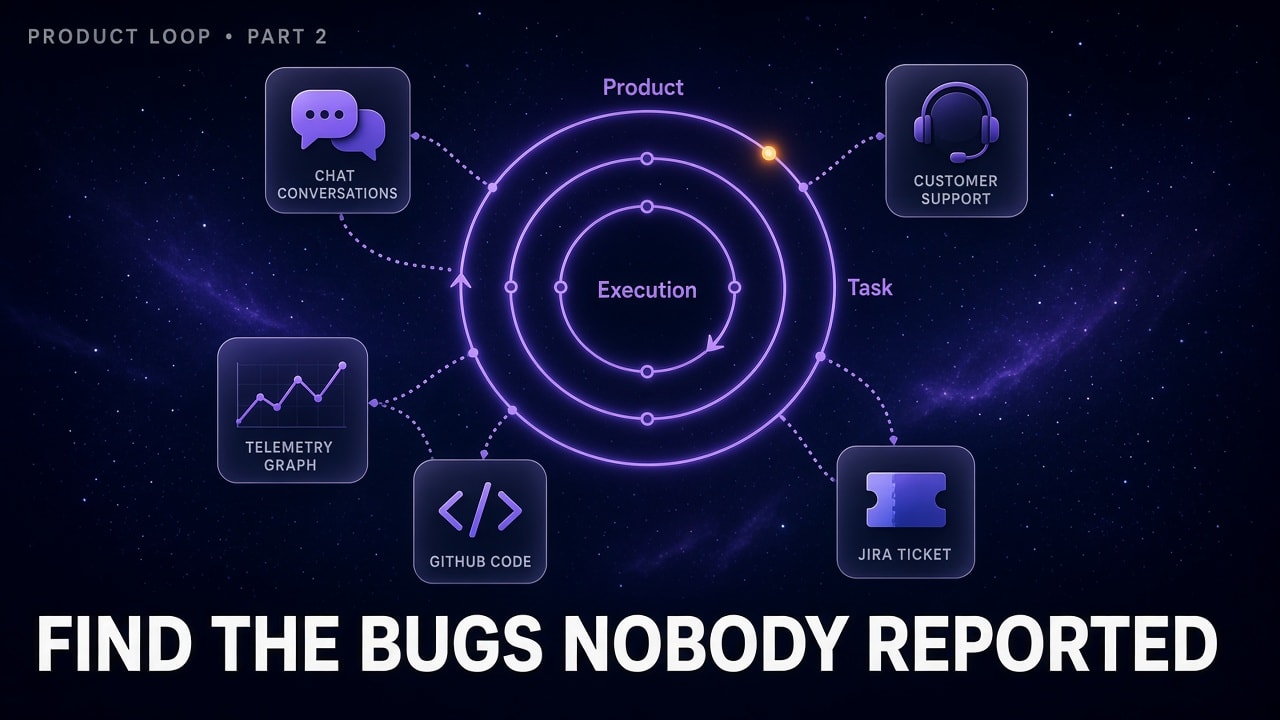
These are three different levels of feedback:
- Execution loop — Take an action, check the result, and decide what to do next. For an agent, that might mean calling a tool and reading its response.
- Task loop — Keep working until the complete task meets its requirements — for example, building a page and checking that it works.
- Product loop — Look across customer experiences, investigate recurring problems, and use the findings to improve the product.
The manager still needs to investigate why meals are arriving cold. The pattern tells them where to look, not automatically what caused it. Product Loop plays a similar role.
When nothing errors, but the customer still struggles
Consider a customer who asks Airo to move an image to the top of a page. The agent says it is done. The customer replies, "No, I meant above the heading." Another attempt follows, then another correction.
The tool calls might all succeed. The customer might eventually get the right result. Yet a simple change has required more effort than it should.
A failure counter may miss that experience. Looking across similar conversations can reveal whether it is an isolated misunderstanding or a recurring problem with how the agent interprets image placement. Not every correction indicates a bug; some iteration is normal. The useful question is whether customers repeatedly have to work around the same behavior.
Sometimes delighting customers means removing the extra explanation they should never have needed to give.
How we bring the evidence together
Product Loop combines sources that each reveal a different part of the problem:
| Source | What it reveals |
|---|---|
| Customer conversations | What customers wanted, where they corrected the agent, and whether the result met their needs |
| Customer care transcripts | What customers reported to support and which problems remained unresolved |
| Telemetry and logs | Which tools and skills ran, their results, and where execution went wrong |
| GitHub code and pull requests | How the relevant capability works and what changed recently |
| Existing Jira issues | Whether the problem is already known and what earlier investigations found |
The product loop agent runs on the Claude Agent harness. Our customer conversations are captured in different backend systems, where the agent can query. Knowledge about the product and its capabilities is sourced through the codebase itself, which helps Product Loop interpret those signals from a code perspective.
The important part is not simply putting more text in front of a model. It is connecting evidence around the same customer goal, application, capability, and time period. Session and application identifiers provide direct links where available; similar wording alone is not enough to establish that two records describe the same incident.
From a repeated symptom to a likely cause
Here is how an investigation could unfold, using the image-placement example. This is an illustration, not a specific production incident.
The first question is whether the problem repeats across customers. Similar requests and corrections can reveal a pattern, but the count needs to reflect affected customers and applications — not just many messages from one long conversation. Comparing those conversations with tool calls and logs then helps distinguish an action that failed from one that succeeded with the wrong interpretation.
That evidence gives the code investigation a direction. A recent change to how the agent selects page sections, for example, would be worth examining. Checking existing Jira issues could also reveal that the behavior predates that change: it may be an old problem whose customer impact was underestimated rather than a new regression.
Timing alone does not prove that a PR caused a bug. A merged change may not even have reached production when the issue occurred. A useful diagnosis connects the behavior, code path, and deployed version where that evidence is available — and makes uncertainty clear where it is not.
A Jira ticket that gives developers a starting point
When Product Loop identifies a recurring issue, it helps us generate a Jira ticket with the investigation attached. The ticket explains what customers tried to do, what happened instead, and how many customers or applications were affected within the observed time window.
The root cause analysis sets out the likely explanation, its supporting evidence, and any questions still open. References to relevant conversations, logs, and code let a developer check the reasoning. When a recent PR appears responsible, the ticket points to it and explains the connection rather than simply naming a suspect.
Product Loop helps us rank issues by reach and severity. Product and engineering can then weigh those findings against urgency, effort, and other commitments. It supports prioritization rather than turning every detected pattern into an automatic roadmap decision.
From diagnosis to a proposed fix
Traditionally, a bug might wait for a customer report, a support escalation, an investigation, and several handoffs before a developer has enough context to start. Product Loop brings much of that evidence gathering and ticket preparation together. Developers spend less time reconstructing what happened and can start with a focused explanation to verify.
The same ticket also gives our coding agent a useful starting point. With authorized access to the codebase, coding agents can follow the cited evidence, test the proposed explanation, and raise a PR with a fix and supporting tests.
Why keep a human in the loop for merges if the diagnosis is already so good?
Because a plausible diagnosis and a working patch are not the same as a safe change. A fix might address the symptom rather than the cause, affect another workflow, or overlook a security or architectural constraint. Though we have automated the majority of our code review process, every change still goes through a human reviewer who checks the reasoning, tests, and the wider consequences of the change.
What changes for the team — and the customer
For the Airo team at GoDaddy, Product Loop is changing how we decide what needs attention. Instead of starting with an isolated customer report and piecing together the story, our developers can start with the conversations, logs, and relevant code in one place. Our product team gets a clearer view of which problems keep recurring — including older backlog issues whose customer impact was easy to underestimate.
For the small business owners using Airo, the goal is not to have a better conversation with an agent. It is to get their website ready and get back to running their business. Having to explain an image placement three times gets in the way of that goal, even if every tool call succeeds. That is why this work matters to us at GoDaddy. We want Airo to take work off our customers' hands, not give them another system to troubleshoot.
Frequently asked questions
What is Product Loop?
Product Loop is a diagnostic system developed by the GoDaddy Airo AI Builder engineering team. It connects customer conversation data, support transcripts, telemetry logs, GitHub pull requests, and Jira issues to identify recurring problems in agentic AI products — including issues that never trigger an explicit error.
What is the difference between the execution loop, task loop, and product loop in agentic AI?
The execution loop covers a single action-and-check cycle (e.g., calling a tool and reading its response). The task loop covers the full sequence of steps needed to complete one customer goal. The product loop operates at the highest level — it looks across many customer sessions to find patterns, recurring failures, and systemic gaps that no single session reveals on its own.
How does Product Loop find bugs that customers never report?
It correlates signals across sources: conversation corrections (where a customer had to re-explain or retry), care transcripts, tool-call logs, and recent code changes. A pattern of similar corrections across multiple customers — even when every tool call succeeds — can indicate a systematic misinterpretation that would never appear in an error log.
Why is human review still required even when an AI agent proposes a fix?
A plausible diagnosis and a working patch are not the same as a safe change. A fix might address the symptom rather than the root cause, introduce a regression in another workflow, or miss a security or architectural constraint. Human reviewers check the reasoning, the tests, and the broader consequences before any change is merged.
What AI model does Product Loop use?
The product loop agent runs on the Claude Agent harness, developed by Anthropic. It queries GoDaddy's internal backend systems for customer conversation data and uses the product codebase as a knowledge source to interpret signals in context.
In the next post, we will look at how the same production signals help us build evaluations around what customers actually do.
This is Part 2 of a series on building and measuring agentic AI products. Read Part 1: When Your Product Stops Having a Single Path to start from the beginning.