How to Connect a Custom Domain to Your Site | Airo AI Builder
How to connect a custom domain to your Airo AI Builder site
A custom domain is your own web address (like mybusinessdomain.com) instead of a temporary project URL. To connect one in Airo AI Builder, you buy a domain (or use one you already own), then connect it from the Domain tab. When you buy through Airo AI Builder, DNS is configured automatically once you connect.
You built your site, chose a plan, and now you are ready to publish. But your web address still looks something like ni69faxn1l . c24 . airoapp . ai. That is not going on a business card, and it is not what you want customers to remember. A custom domain turns a live project into something people can find, share, and trust.
What you need before you start
- A project in Airo AI Builder
- A paid plan to publish your site and connect a custom domain (the free plan includes 50 AI credits to get started, but publishing requires an upgrade)
- A GoDaddy account (created when you sign up for Airo AI Builder)
- A domain name (buy one inside the builder, or use one you already own in your GoDaddy account)
If you already own a domain through GoDaddy, skip the purchase step and connect it directly.
How to buy and connect a custom domain
Custom domains in Airo AI Builder work in two steps: buy the domain first, then connect it to your project. If you purchase through Airo AI Builder, the domain is added to your GoDaddy account. From there, you connect it from the Domain tab.
Step 1: Buy your domain
You can start a domain purchase from three places in Airo AI Builder:
| Where to start | Best if you… |
|---|---|
| Chat | Want the fastest path — type what you need and pick from available domains |
| Domain tab (globe icon) | Prefer settings over chat — browse options and click Buy a New Domain |
| Publish button | Are publishing now — choose Connect a Custom Domain, then Buy a New Domain |
Option 1: Ask in the chat
Type something like:
“I want to buy a domain name sohobrew.com”
Airo AI Builder searches for available domains and shows your options in the chat.
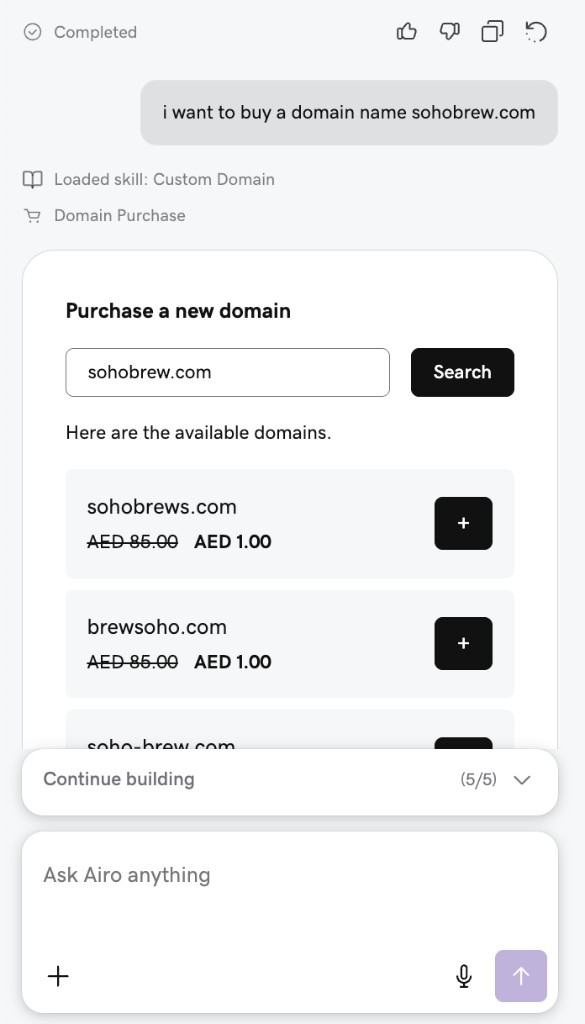
Select the domain you want and complete checkout. The domain is added to your GoDaddy account.
Option 2: Use the Domain tab
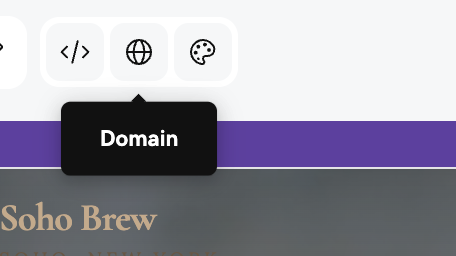
Click the globe icon in the top toolbar to open your domain settings.
Here you can see your temporary web address and any custom domains connected to your site.
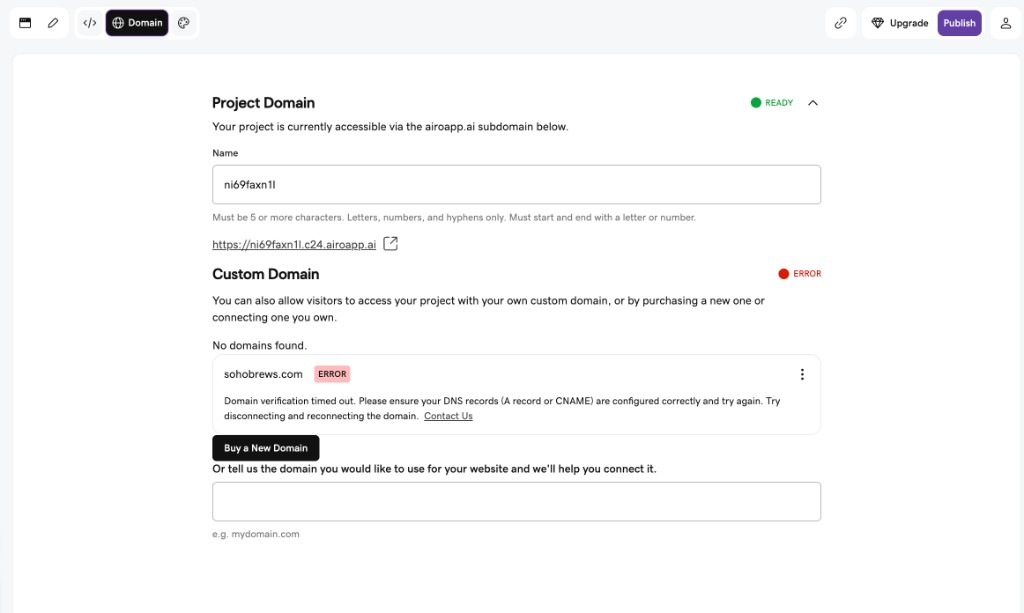
Click Buy a New Domain at the bottom of the panel. Search for your domain name, add it to your cart, and complete checkout on GoDaddy.
Related: How to buy a domain name
Option 3: Through the Publish button
Click Publish in the top right corner. Choose Connect a Custom Domain before or after publishing. This opens the same Domain tab, where you can click Buy a New Domain to start checkout.
Step 2: Connect your domain to your project
Once your domain is in your GoDaddy account, connect it from the Domain tab.
From the Custom Domain section, you can:
- Connect a domain you already own by typing it into the text field at the bottom, or selecting it from your GoDaddy account
- Click the three-dot menu next to a domain and select Connect Domain
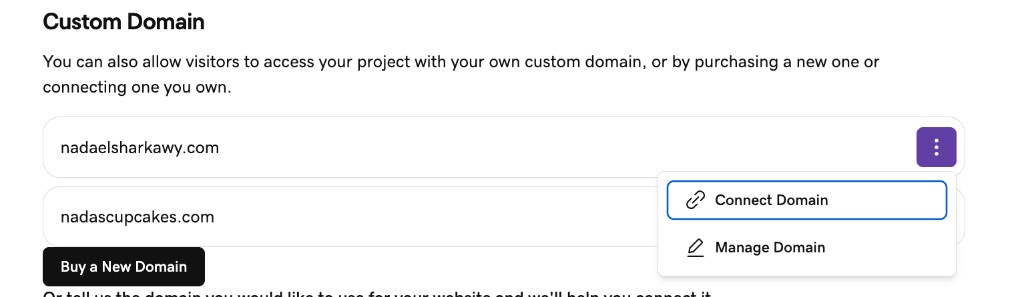
Buying and connecting are two separate steps. After checkout, open the Domain tab and connect the domain to your project. When you buy through Airo AI Builder, DNS is configured for you automatically once you connect. No manual DNS setup on your end.
Connect a domain you already own
If your domain is already in your GoDaddy account, open the Domain tab, type your domain into the text field at the bottom, and Airo AI Builder connects it to your project.
If your domain is registered with another provider, you will need to update settings in that provider’s dashboard to point the domain to your Airo AI Builder site. The Domain tab shows you exactly what to enter. Changes can take up to 48 hours to take effect.
Troubleshooting
| Issue | What to do |
|---|---|
| Domain shows an error | Disconnect and reconnect the domain. If you bought elsewhere, confirm your domain settings match what Airo AI Builder shows. |
| Domain verification timed out | Wait up to 48 hours for changes to propagate, then try again. If you use another provider, double-check every setting matches. |
| Domain purchased but not connected | Open the Domain tab, find your domain, click the three-dot menu, and select Connect Domain. |
| Want to change your temporary web address | Open the Domain tab and edit the Name field under Project Domain. Must be 5+ characters; letters, numbers, and hyphens only. |
Frequently asked questions
What is a custom domain?
A custom domain is a web address you choose and own (like mybusiness.com) that replaces the temporary URL Airo AI Builder assigns when you publish. It is what you put on business cards, in email signatures, and in search results.
How do I connect a custom domain to a site built with Airo AI Builder?
Open the Domain tab (globe icon in the toolbar). Click Buy a New Domain to purchase one, or type in a domain you already own. If you buy through Airo AI Builder, the connection is set up automatically.
Do I need to configure anything manually?
No manual configuration is needed when you buy through Airo AI Builder. If you connect a domain from another provider, you will update a few settings in that provider’s dashboard to point the domain to your site.
How much does a domain cost?
Pricing depends on the extension (.com, .net, etc.) and availability. Airo AI Builder shows current pricing when you search. Promotional first-year pricing varies by domain; renewal pricing is typically higher than the introductory rate. Check pricing at checkout before you purchase.
How long until my custom domain works?
If you buy and connect through Airo AI Builder, your domain can go live shortly after connection. If you connect a domain from another provider, allow up to 48 hours for DNS changes to take effect.
Can I connect more than one domain to the same project?
Yes. Add multiple custom domains under the Custom Domain section in the Domain tab.
Where does my domain live after I buy it?
In your GoDaddy account. Manage billing, renewals, and settings from the GoDaddy Domains dashboard at any time.
Can I connect a custom domain on the free plan?
No. Publishing your site and connecting a custom domain require a paid plan. The free plan gives you 50 AI credits to build and preview your project. When you are ready to go live with your own domain, upgrade to a paid plan first.
Can I use a domain I bought somewhere else?
Yes. Enter your domain in the Custom Domain section and follow the instructions Airo AI Builder provides.
Key takeaways
- A custom domain is your own web address (like
mybusinessdomain.com) — not the temporary URL assigned at publish - Publishing and connecting a custom domain require a paid plan; the free plan (50 AI credits) is for building and previewing
- The process is two steps: buy the domain, then connect it from the Domain tab
- You can buy from chat, the Domain tab, or the Publish flow — all paths lead to the same checkout
- Purchases through Airo AI Builder are added to your GoDaddy account; connect from the Domain tab and DNS is handled automatically
- Domains from other providers work, but you manage the DNS settings yourself and should allow up to 48 hours for changes
Start building with Airo AI Builder
Build your site with 50 free AI credits. When you are ready to publish and connect a custom domain, upgrade to a paid plan.
Start building with Airo AI Builder
When your domain goes live, share it in the Airo Builder Lab Discord.